Making a drill beat can feel like entering a new world. Drill music is known for its dark energy, fast hi-hats, and heavy bass. It started in Chicago, grew in London, and is now popular all over the globe. If you’re a beginner, creating your first drill beat may seem hard, but it’s not as complicated as you think.
With the right tools, some basic knowledge, and a bit of patience, you can make your own drill track—even if you’re just starting out.
In this guide, you’ll learn everything you need to know to create a drill beat step by step. You’ll find out which software to use, how to choose sounds, how to build rhythm, and how to finish your beat like a pro.
Along the way, you’ll discover secrets that most beginners miss, such as how to make your hi-hats bounce or how to get that deep, sliding bass. By the end, you’ll be ready to make drill beats that sound fresh and powerful.
Understanding Drill Music
Before you start, it’s important to know what makes drill music unique. Drill is more than just a style—it’s a feeling. The main features are:
- Dark melodies: Often minor keys, with gloomy or eerie sounds.
- Fast hi-hats: Many beats use hi-hats with quick rhythms and rolls.
- Heavy bass: The 808 bass is deep and sometimes slides between notes.
- Syncopation: The rhythm is often offbeat, with kicks and snares placed in unusual spots.
Drill music became famous in Chicago in the early 2010s. Artists like Chief Keef and Lil Durk brought the sound to the world. Later, UK drill added its own flavor, with sharper drums and more complex rhythms. Drill is now used by artists everywhere, from New York to Nigeria.
One key thing that sets drill apart from other hip-hop or trap styles is its sense of space and tension. Drill beats often feel cold or aggressive, with melodies that can be haunting. The drums don’t just follow a simple loop—they create a groove that feels unpredictable.
This unique rhythm is part of why drill is so popular for rapping, as it gives vocalists room to be creative.
Another important detail: drill often uses sampled melodies, sometimes from unexpected sources like classical music or old movie soundtracks. These samples are usually chopped and pitched to match the dark mood. This gives drill beats a cinematic quality, making them memorable and full of atmosphere.
Choosing Your Tools
To make a drill beat, you need a digital audio workstation (DAW). This is software for making music. Popular DAWs are:
- FL Studio
- Ableton Live
- Logic Pro
- GarageBand (for Mac users)
- Reason
Most beginners start with FL Studio or Ableton Live because they’re easy to learn. You can download a demo version to try before you buy.
You also need drum kits and sound packs. Many producers use free packs, but paid packs often have better quality. Look for packs labeled “drill,” “trap,” or “808 kit.” These will have the sounds you need: hard kicks, sharp snares, deep 808s, and fast hi-hats.
If you want to use real instruments, you’ll need a MIDI keyboard. But you can also use your computer keyboard or draw notes with your mouse.
Here’s a simple comparison of three popular DAWs for drill beats:
| DAW | Price Range | Ease of Use | Drill Sound Support |
|---|---|---|---|
| FL Studio | $99-$299 | Beginner-Friendly | Excellent |
| Ableton Live | $99-$749 | Moderate | Very Good |
| Logic Pro | $199 | Moderate | Good |
When you’re picking your DAW, think about what you want long-term. FL Studio has lots of video tutorials for drill, which is great if you’re teaching yourself. Ableton Live is popular for live performance, so it’s a good choice if you want to eventually perform your beats.
Logic Pro is a strong option for Mac users who want a professional sound library.
Don’t worry about having fancy hardware when you start. Many famous producers began with just a laptop and headphones. Good speakers and a MIDI keyboard help, but they’re not required for your first tracks.
Credit: blog.native-instruments.com
Setting Up Your Project
Open your DAW and create a new project. Set your tempo between 140 and 150 BPM. Most drill beats use this range. UK drill often uses 140 BPM, while New York drill can go up to 150 BPM.
Choose a time signature of 4/4. This means four beats per bar. Almost all drill tracks use this structure.
Organize your tracks like this:
- Track 1: Kick
- Track 2: Snare
- Track 3: Hi-Hat
- Track 4: 808 Bass
- Track 5: Melody
- Track 6: FX (sound effects)
This setup helps you keep your beat organized and makes mixing easier later.
A helpful tip is to color-code your tracks. For example, make all drum tracks red, melodic tracks blue, and effects yellow. This small step saves time when you have many sounds to manage.
Set your project to loop over 8 or 16 bars so you can hear your beat repeat as you build it. This looping helps you notice if something sounds off or if the beat is getting too repetitive.
Another non-obvious setup trick: set your DAW’s grid to show subdivisions like 1/16 or 1/32 notes. Drill beats often use fast hi-hat rolls and complex rhythms, so seeing these divisions makes it easier to draw in the right notes.
Building The Drum Pattern
Drill drums are the heart of the beat. Here’s how to build each part:
Kicks
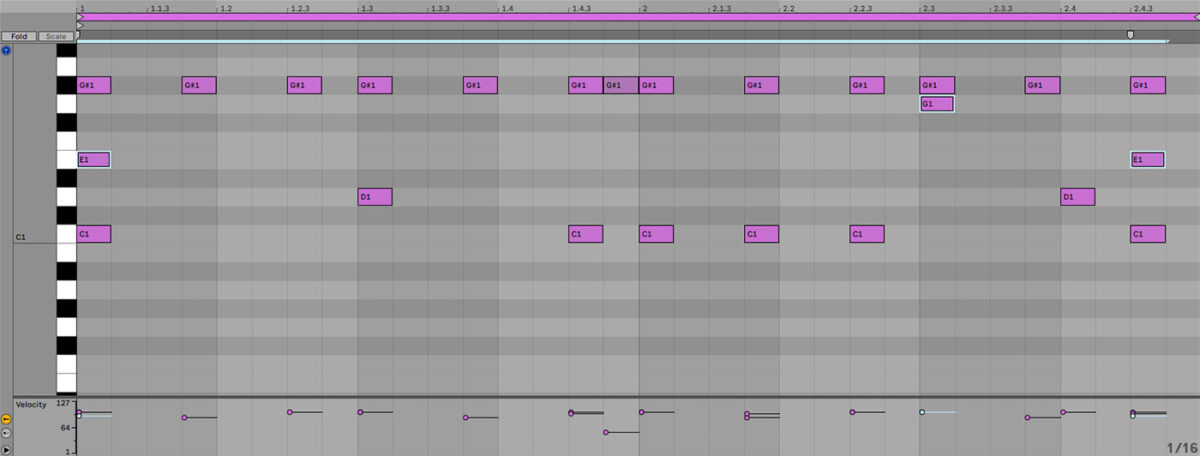
The kick is deep and punchy. It usually hits on the first beat and then in unexpected places. Don’t put kicks on every beat—leave space for the groove.
Example pattern for a 4-bar loop:
- Kick on beat 1
- Kick on beat 3 (sometimes)
- Kick in between beats for bounce
A trick many experienced producers use is to slightly shift some kick notes off the exact grid. This “humanizes” the groove and makes the beat feel less robotic. Try nudging a kick a tiny bit earlier or later and see how it changes the vibe.
Snares
The snare gives drill its signature sound. Place your snare on the third beat of each bar. Some drill beats use a second snare or clap for extra energy.
Tip: Layer your snare with a clap to make it thicker.
Try adding a “ghost snare” (a quiet snare hit) just before or after the main snare. This adds swing and makes the rhythm more interesting. Sometimes, a rimshot or a short percussion sound is layered with the snare for extra snap.
Hi-hats
Drill hi-hats are fast and full of rolls. Start with a basic hi-hat on every half-beat, then add rolls and stutters for bounce.
Common drill hi-hat patterns:
- 1/8 notes for basic rhythm
- 1/16 notes for speed
- Hi-hat rolls using 1/32 notes
Use your DAW’s “note repeat” or draw in rolls manually. Try changing the pitch of some hi-hats for variation.
For extra groove, add small gaps or triplet hi-hats. This makes the hi-hats swing and gives the beat personality. If you listen to top drill tracks, you’ll notice the hi-hats are rarely just a simple loop—they move, stutter, and sometimes even play “reverse” notes.
Percussion And Fx
Add extra percussion like rimshots, open hats, or snaps. Use FX like risers, crashes, or gunshot sounds for drama.
Many beginners forget percussion and FX, but they make your beat sound professional.
Experiment with percussive sounds from different cultures or genres. Sometimes a unique percussion sample can give your beat a distinct identity. Don’t be afraid to try sounds like shakers, whistles, or even chopped-up vocal samples as background percussion.
Creating The Melody
Drill melodies are dark, eerie, and simple. You don’t need complex chords—just a few notes can create the right mood.
Choosing Instruments
Use pianos, strings, synths, or bells for your melody. The sound should feel cold, mysterious, or tense.
Popular VST plugins for drill melodies:
- Omnisphere
- Serum
- Kontakt
- Spitfire Labs (free)
You can also find good sounds in your DAW’s built-in library. Don’t feel like you need expensive plugins to get started.
Try using layered sounds for extra depth. For example, play the same melody with a bell and a soft string at the same time. This creates a richer, more cinematic sound. Some producers also use a low-pass filter to remove high frequencies from one layer, making space for vocals and drums.
Writing The Melody
- Set your scale to minor (A minor, D minor, etc. ).
- Start with 3-5 notes. Try a repeating pattern.
- Use short phrases and leave space.
- Add effects like reverb or delay for atmosphere.
Example: Play a simple melody with a bell sound, then layer strings underneath for depth.
If you’re stuck, try playing just two or three notes in a repeating rhythm. Sometimes, the simplest melodies are the most memorable in drill.
Non-obvious Insight
Many beginners overcomplicate their melodies. In drill, less is more. Let the drums and bass do most of the work. Use simple, catchy patterns.
Another tip: experiment with using slightly off-key or detuned notes. This adds tension and darkness, making your melody stand out. Don’t be afraid to break music theory rules if it sounds good.
Making The 808 Bass
The 808 bass is the backbone of drill. It’s deep, slides between notes, and sometimes distorts for extra energy.
Choosing The Right 808
Find an 808 sample that’s clean and powerful. You can use free packs, but paid packs often have better 808s. Look for “drill 808” samples.
Each 808 has its own character. Some are very clean and subby, while others are distorted and aggressive. Listen to a few options before choosing one for your beat.
Placing The 808
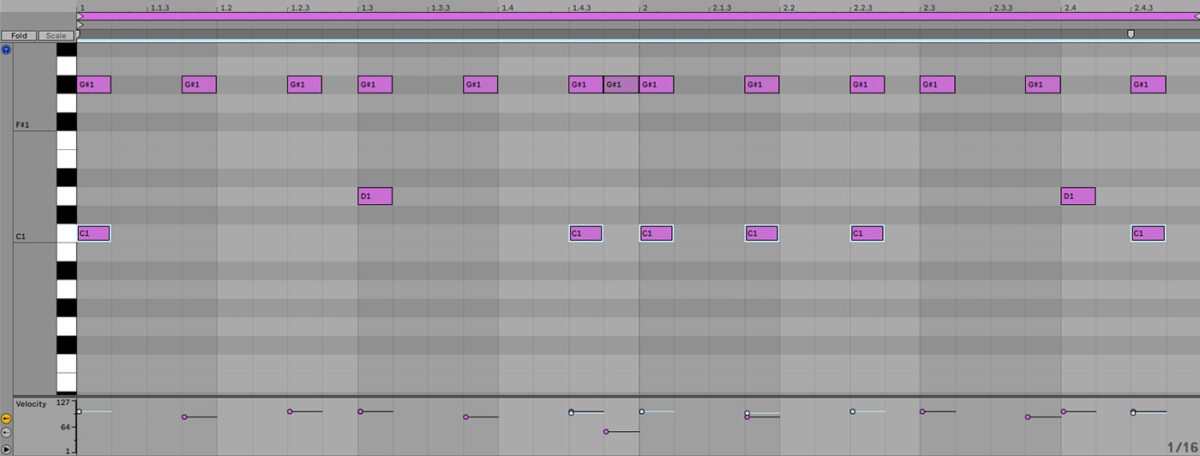
Match the 808 to the kick. When the kick hits, the 808 should play the same note. But in drill, you can add slides and bends.
How to add slides:
- Draw a long note in your DAW
- Change the pitch at the end of the note
- Use a “portamento” or “slide” function
Try sliding from a higher note down to the root, or from the root up to another note. These slides can be short (over half a beat) or long (over several beats). Experiment to see what fits your melody.
Mixing The 808
Make sure the 808 doesn’t clash with the kick. Lower the volume of the 808 if it’s too loud. Add distortion for extra punch.
If your 808 sounds weak on small speakers or headphones, try layering a soft, higher bass note an octave up. This helps the bass “cut through” on any system.
Example Table: 808 Types And Uses
| 808 Type | Sound Character | Best Use |
|---|---|---|
| Clean 808 | Deep, smooth | Classic drill |
| Distorted 808 | Rough, gritty | High-energy drill |
| Sliding 808 | Bends between notes | UK drill, modern drill |
A non-obvious insight: if your 808 “disappears” when other sounds play, try sidechain compression. This makes the 808 duck (lower in volume) when the kick hits, so both can be heard clearly.
Arranging Your Beat
Once you have your drum pattern, melody, and 808, it’s time to arrange the beat. Arrangement means deciding how your beat flows from start to finish.
Common Drill Beat Structure
- Intro: 4-8 bars, simple melody, no drums
- Verse: Full drums, melody, 808
- Chorus: Add extra sounds, maybe change melody
- Bridge: Take out drums, keep melody
- Outro: Fade out, remove elements
You don’t have to follow this exactly, but it helps your beat stay interesting.
A good arrangement keeps the listener’s attention. Try switching instruments or muting drums for a few bars. Add a short “breakdown” where only the melody plays before the drums return.
You can also use “drops”—moments where everything except one or two sounds stop for a second. This builds excitement before the next section comes in.
Tips For Arrangement
- Change the melody every 8 bars for variety.
- Drop out drums for a few bars to create tension.
- Add FX (like gunshots or risers) before the chorus.
Many beginners make beats that are too repetitive. Small changes keep your beat fresh.
Another creative trick is to automate the filter on your melody or FX so they slowly fade in or out. This makes each section feel different, even if the notes are the same.
Mixing Your Drill Beat
Mixing is making sure all sounds fit together. Here’s how to mix your drill beat:
Levels
Set the volume for each track. The kick and snare should be loud, the melody softer, and the 808 deep but not overpowering.
If you’re unsure about levels, listen to your favorite drill songs and compare your beat. Reference tracks are a great way to check if your mix is balanced.
Eq
Use EQ to cut low frequencies from the melody and drums. This leaves space for the 808 bass.
Try boosting the high end (treble) of your hi-hats to make them shine. Cut some midrange from the melody if it fights with the vocals.
Compression
Add compression to the drums to make them punchy. But don’t overdo it—too much compression can ruin the groove.
Some producers use parallel compression: send your drums to a second channel, compress that channel hard, then mix it under the original. This makes drums louder and more exciting without losing dynamics.
Reverb And Effects
Add reverb to the melody for space. Use delay on FX for movement. Don’t put reverb on the kick or 808—they should stay dry.
For a unique drill sound, try using “reverse reverb” on a snare or melody. This creates a swelling sound before the main hit, adding drama.
Example Table: Mixing Tips
| Track | Volume Level | EQ Tip | Effect |
|---|---|---|---|
| Kick | High | Boost low end | None |
| Snare | Medium-High | Cut low end | Light reverb |
| Hi-Hat | Medium | Cut low end | Delay |
| 808 | High | Boost sub | Distortion (optional) |
| Melody | Medium-Low | Cut below 100 Hz | Reverb |
A common mistake: mixing only on headphones. Always check your beat on speakers, car audio, or even your phone. This helps you catch mixing issues that headphones can hide.
Credit: blog.native-instruments.com
Exporting Your Beat
When your beat is finished and mixed, export it. Choose WAV or MP3 format. WAV is best for quality, MP3 is smaller and easier to share.
Set your export settings:
- Sample rate: 44.1 kHz
- Bit depth: 16-bit or 24-bit
Name your beat something unique, like “Drill Beat 01. ” Save your project files in case you want to change something later.
If you want to share your beat on YouTube or Instagram, you might want to add a simple “producer tag” (a short vocal or sound) at the start. This helps people know it’s your work.
Also, consider exporting both a full version (with all instruments) and an instrumental version (just the beat, no tags or FX). Artists often want clean versions for recording vocals.
Common Beginner Mistakes
Many new producers make mistakes that stop their beats from sounding professional. Here are the most common ones:
- Overcrowding the beat: Too many sounds can make your beat muddy.
- Ignoring mixing: If you don’t mix, your beat won’t sound clear.
- Bad 808 placement: If the 808 doesn’t match the kick, your beat loses power.
- No bounce: Drill needs rhythm and swing. Without hi-hat rolls, it feels flat.
- Not using FX: FX add drama and movement.
Non-obvious tip: Sometimes, less is more. Leaving space in your beat makes it sound bigger and more professional.
Another common mistake: not referencing your beat with real songs. Always compare your work to songs you admire. This helps you spot problems with your sounds, levels, or energy.
Don’t forget to save different versions as you go. Sometimes you’ll like an old version better than a new one, especially after your ears rest.

Credit: www.youtube.com
Advanced Drill Techniques
As you get better, you can try these advanced tricks:
Pitch Bending
Use pitch bend on your 808 or melody. This makes your beat sound modern and unique.
You can automate pitch bends in your DAW, or draw them in with MIDI. Try bending up a whole step just before a chorus or drop.
Reverse Effects
Reverse a melody or drum sound for a cool intro or transition.
For example, reverse a snare hit so it “swells” into the main snare. Or reverse a piano chord for a dreamy, eerie feeling.
Layering
Layer two melodies or two snares to create a richer sound.
Try stacking a soft pad under your main melody, or layering a clap with your snare for more snap. Experiment with blending different instruments at low volume for a more complex mix.
Automation
Automate volume or effects to make your beat change over time.
You can slowly increase the reverb on your melody in the breakdown, or automate a filter to open up as the chorus hits. Automation keeps your beat from sounding static.
Most beginners don’t use automation, but it can make your beat stand out.
A lesser-known technique: automate the panning of percussion or FX. Having sounds move left to right adds a sense of space and can surprise listeners.
Where To Find Inspiration
If you’re stuck, listen to drill beats from top producers:
- 808Melo (UK/NY drill)
- Young Chop (Chicago drill)
- Ghosty (UK drill)
- Axl Beats (global drill)
Study their patterns, sounds, and arrangement. Try copying their style, then add your own twist.
You can also find free tutorials on YouTube, or join online forums like Reddit’s r/DrillMusic.
For more in-depth information, check this Wikipedia article about Drill music.
A great way to find inspiration is to sample music from other genres. Drill producers often use samples from classical music, movie soundtracks, or old soul tracks. Chop up a sample, pitch it down, and add your own drums for a unique twist.
Don’t just limit yourself to drill. Listen to grime, trap, or even electronic music. You’ll find ideas you can bring into your drill beats.
Practical Tips For Beginners
Here are some tips to make your drill beats better:
- Use short melodies and leave space for vocals.
- Try different drum kits to find your favorite sound.
- Experiment with hi-hat patterns for bounce.
- Use slides in your 808 for a modern drill feel.
- Save your project often—software crashes can lose your work.
- Don’t compare your first beats to professional tracks. Everyone starts somewhere.
If you want your beats to get noticed, keep learning and practicing. The more beats you make, the better you’ll get.
Another beginner-friendly tip: collaborate with friends or other producers online. Trading ideas and projects helps you learn faster and keeps you motivated. Sometimes, a fresh set of ears can turn a simple beat into something special.
As you practice, challenge yourself to finish beats quickly. Don’t get stuck chasing perfection. The more complete tracks you make, the faster you’ll improve.
Frequently Asked Questions
What Is The Best Daw For Making Drill Beats?
The best DAW depends on your style and budget. FL Studio is popular for drill because it’s easy to use and has good drum sequencing. Ableton Live and Logic Pro are also great choices. Try a demo and see which feels best.
How Do I Make My Drill Beat Sound Professional?
Focus on mixing, arrangement, and using high-quality sounds. Make sure your drums are punchy and your 808 is deep. Use effects like reverb and delay, but don’t overdo it. Leave space in your beat for vocals.
What Tempo Should I Use For A Drill Beat?
Most drill beats are between 140 and 150 BPM. UK drill is usually 140 BPM, while New York drill can be faster. Set your DAW to 140 BPM for a classic drill sound.
How Do I Get The “slide” Effect In My 808?
Use the portamento or slide function in your DAW. Draw a long 808 note, then change the pitch at the end. This makes the 808 glide between notes. Some DAWs let you automate this with MIDI.
Can I Make Drill Beats On My Phone?
Yes, you can use apps like GarageBand, FL Studio Mobile, or BeatMaker. These are simpler than desktop DAWs but can make real drill beats. Try them if you don’t have a computer.
If you want to get the best sound, try using high-quality headphones or small speakers to check your mix. Even if you make beats on your phone, you can transfer them to a computer later to add more details or mix them better.
Making drill beats is a journey. At first, you’ll face challenges—learning software, finding sounds, understanding rhythms. But every beat you make teaches you something new. Drill music is about energy, attitude, and creativity. Don’t be afraid to experiment, make mistakes, and push your limits.
With these steps, you’re ready to start creating your own drill beats. Soon, you’ll be making tracks that sound fresh and powerful, and you’ll have the confidence to share your music with the world.